Close the lid. Keep the run alive.
OpenLid is a tiny menu bar utility that stops macOS from sleeping when you close the lid — so builds, coding agents, downloads, and remote sessions keep running while you walk away.
- Signed + notarized
- No telemetry
- No sudo
- Open source
$brew install --cask openlid/tap/openlid
$openlid on
✓Preventing sleep until you turn it off
01
Mac stays awake
Display can be off. Sleep stays blocked.
02
Local work continues
Builds, downloads, agents, and shells keep running.
03
Remote path remains open
Use your trusted SSH, VNC, Tailscale, or app bridge.
04
Phone controls the session
Check in without turning the laptop into a server.
- macOS 13+
- Apple Silicon
- Signed & notarized
- No telemetry
- Apache-2.0
captured from the running app
Native Mac controls, not a fake dashboard.
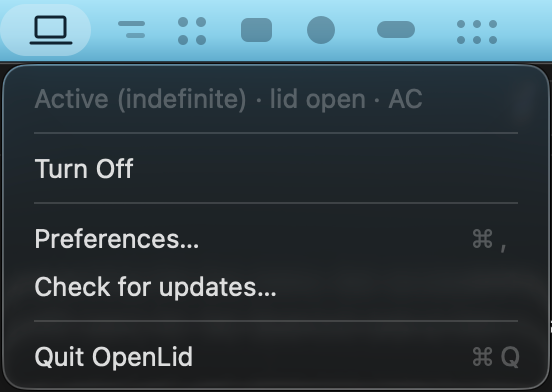
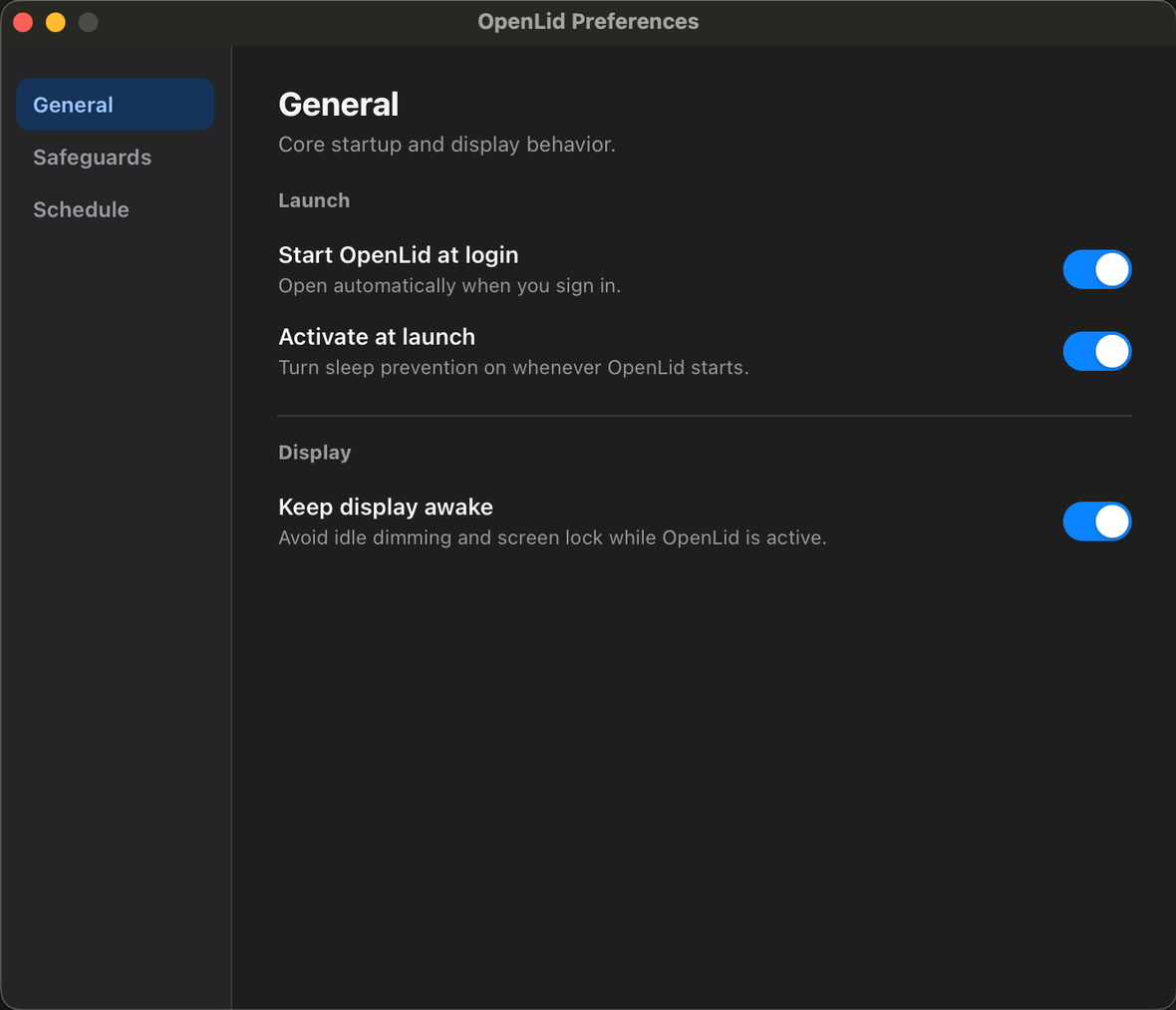
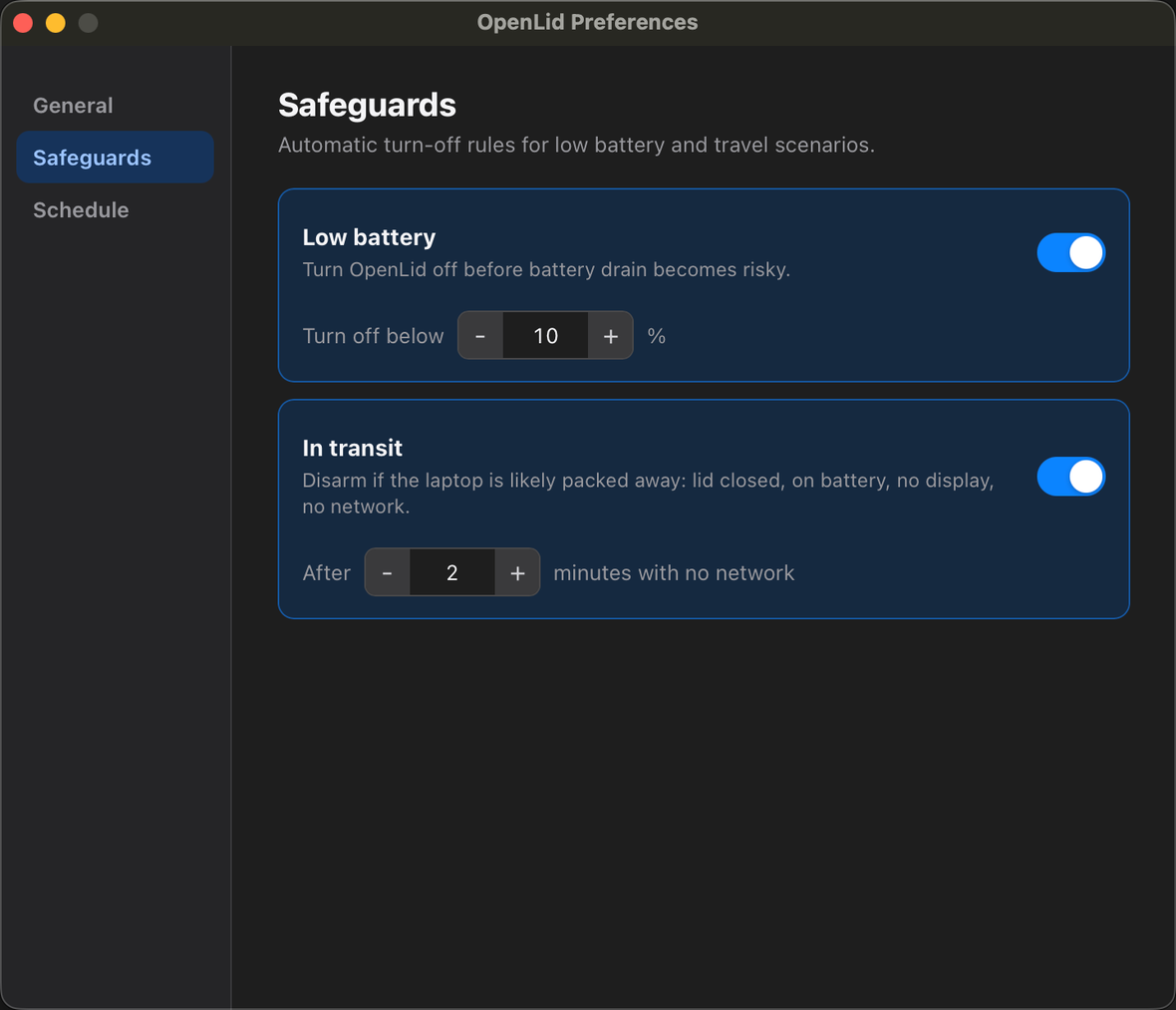
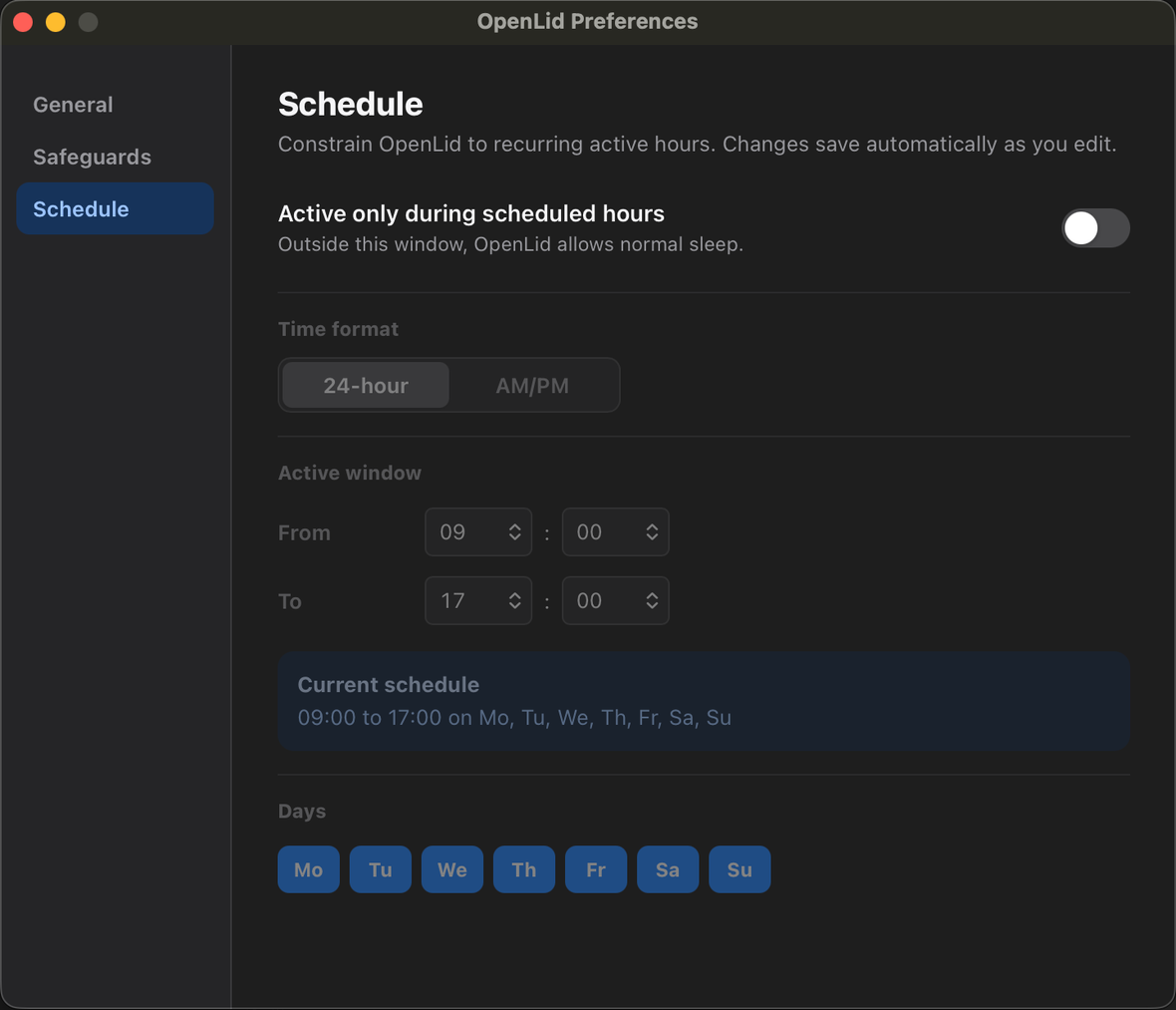
OpenLid lives where a sleep-prevention utility should: the menu bar for quick action, and a native Preferences window for startup, safeguards, and schedule rules.
For the moments macOS gets in your way.
Closing the lid sleeps the system. Stepping away locks the screen. OpenLid quietly handles both — without leaving sleep disabled forever.
$cargo build --release
Compiling openlid-core v2.3.2
// lid closed — 09:41
Compiling openlid v2.3.2
✓Finished release [optimized] in 3m 12s
Carry it without killing the run
A coding agent is mid-task. Your build is four minutes out. Close the lid, walk to the meeting room — the work keeps going instead of dying on sleep.
Stop the lock-screen tax
At your desk, step away for five minutes and come back to a locked screen — for the third time today. Keep the display awake while OpenLid is on, including closed-lid remote sessions.
Small utility. Serious control.
Everything you'd want from a sleep-prevention tool, and nothing you wouldn't — native, precise, and out of your way.
Primary control
One-click toggle
Left-click the menu bar icon to arm or disarm. Right-click for the full menu and status.
Recurring schedule
Keep sleep prevention active only during set hours — e.g. 08:00–18:00 on weekdays. UI or CLI.
Display stays awake
No idle dim, no screen lock while active — including closed-lid VNC. Opt out anytime.
Display off on lid close
Turns the built-in panel off to save battery and thermals — skipped when an external display is attached.
Battery & transit safeguards
Auto-deactivate below a battery threshold, or when OpenLid detects the laptop is packed away.
First-class CLI
Script everything: openlid on / off / status / schedule. Machine-readable --json output.
Coding agents on the go
Let Claude Code and Codex keep working while your laptop is closed.
Start a coding harness on your Mac, arm OpenLid, close the lid, and keep an eye on the session from your phone through Codex remote connections, Claude Code Remote Control, SSH, Tailscale, Screen Sharing, or your remote terminal of choice.
Agent runs on the Mac
Official mobile control stays reachable
Phone becomes the control surface
$openlid on
✓Active — preventing sleep now
$tmux new -s codex
$codex
Working tree ready · waiting for instructions
// lid closed, session still alive
$open ChatGPT → Codex
$open Claude app → Code
✓Back in the local agent session
Built for the terminal
Drive everything from the command line.
The Homebrew install puts openlid on your PATH. Arm it, schedule it, or check status from scripts and CI — with machine-readable --json output on every command.
- Single binary, no daemon to babysit
- Locked subcommands & config schema under semver
- Same state whether you use the menu bar or the CLI
$openlid on
✓Active — preventing sleep now
$openlid schedule set --from 08:00 --to 18:00 \
$ --days Mon,Tue,Wed,Thu,Fri
✓Schedule saved · active 08:00–18:00
$openlid status --json
{ "state": "active", "lid": "closed",
"power": "ac", "schedule": true }
No telemetry. No data leaves your machine. Ever.
OpenLid does one job and respects your machine while doing it. There's nothing to sign in to and nothing to opt out of.
Zero telemetry
No analytics, no tracking, no phone-home. The app only touches the network when you run openlid update.
Everything stays local
All state lives in ~/Library/Application Support on your machine. Nothing is collected or transmitted.
Open source & auditable
Apache-2.0, signed and notarized. Read every line on GitHub and build it yourself if you want.
macOS today. More platforms next.
Built in Rust with a platform-abstraction core, so new operating systems are a backend addition — not a rebuild.
macOS — stable
v2.3.2shippedMenu bar app, first-class CLI, recurring schedules, battery & transit safeguards. Signed, notarized, Homebrew tap. Locked API under semver.
Linux support
v3.0.0plannedA logind backend over D-Bus, wired into the cross-platform openlid-core traits. Tray icon or headless daemon driven by the CLI.
Windows — on demand
FutureplannedSetThreadExecutionState + power-broadcast backend. The core traits are already cross-platform-shaped, so this is an addition, not a rewrite.
OpenLid started with a meme about the half-open laptop era.
The joke was simple: after coding agents, engineers suddenly needed their laptops to keep working even when the lid was almost closed. OpenLid turned that joke into a small utility with real guardrails.
Read how it startedFAQ
Questions, answered.
The practical details — signing, privacy, scheduling, heat, and cleanup — straight from the project's docs.
- Does OpenLid keep my Mac awake with the lid closed and no external display?
- Yes — that's the whole point. While OpenLid is active it prevents macOS from sleeping when you close the lid, even without an external monitor, so builds, coding agents, downloads, and remote sessions keep running. It also turns the built-in display off on lid close to protect battery and thermals.
- Will macOS show an “unidentified developer” warning?
- No. The Homebrew cask and the direct DMG are both Apple-signed and notarized, so OpenLid opens without any Gatekeeper right-click workaround. (Only a build you compile from source is ad-hoc-signed and would warn.)
- Does OpenLid need my admin password or a kernel extension?
- No kernel extension and no sudo. The privileged helper installs automatically through Apple's SMAppService — you just approve OpenLid once under System Settings → General → Login Items → Allow in the Background.
- Does OpenLid collect any data?
- No telemetry, no analytics, nothing leaves your machine. OpenLid only touches the network when you explicitly run “openlid update” or click “Check for updates…”. All state stays local in ~/Library/Application Support/io.openlid.app.
- Can I keep it awake only during certain hours?
- Yes. Set a recurring schedule (for example 08:00–18:00 on weekdays) from the menu bar or the CLI. OpenLid can also auto-deactivate below a battery threshold or when it detects the laptop is being carried in transit.
- What about heat and battery if it's running in a bag?
- A closed lid traps heat, so keep an eye on the machine under heavy load. OpenLid turns the internal display off on lid close to reduce heat and drain, and its battery-threshold safeguard can automatically return the Mac to normal sleep before the charge gets low.
- How do I update or uninstall OpenLid?
- Update with “brew upgrade --cask openlid/tap/openlid” or the built-in “openlid update”. Uninstall with “brew uninstall --cask openlid/tap/openlid” (add --zap to also clear preferences), or remove /Applications/OpenLid.app manually.
- Is OpenLid free and open source?
- Yes — it's Apache-2.0 licensed and the full source is on GitHub. It runs on macOS 13+ (Apple Silicon) today, with Linux support planned for v3.0.0.
Start the build. Close the lid anyway.
Free and open source. Install in seconds, arm it with one click, and stop fighting your laptop's sleep settings.
$brew install --cask openlid/tap/openlid
Prefer the DMG or building from source? Install options